12.90 €
Loading...
Prices might not be the same in the stores and the webshop.
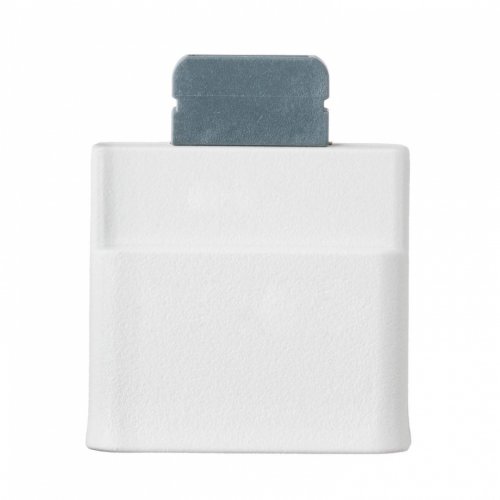
Well now you have an answer. Datel's Transfer Kit for Xbox 360 allows you to transfer data from your Xbox 360 memory cards to your PC. By using your PC's storage capacity to back up unlimited 'images' of your Xbox 360 memory cards, you can archive and restore them at any time – you need never be short of save space again. But how does it work? • Back Up… Backing up your memory card couldn't be simpler. Open the Memory Card blade on your Transfer Kit PC application, and connect your memory card to the adapter. Plug the adapter into your PC's USB port and you see the 'Connected' LED shown in the bottom right corner of the interface. You now add a file name and description in the fields provided (date and time are added for you), and press the Backup button. Your memory card is backed up to your PC's hard drive, ready for restoration whenever the mood takes you. This backup file is known as an 'image', and contains the entire contents of the memory card you backed up. • Restore… Restoring a saved memory card is just as simple. First of all, in the PC application, click on the 'Hard Drive' blade. You're shown a list of backed-up memory card images, replete with the date and time at which they were saved and the name and description entered when you backed up. To restore, once again attach the adapter and plug in the memory card. Click on the image you wish to transfer to your memory card and press Restore. All info on the card will be wiped, so make sure any saves you wish to keep are backed up before restoring an image back onto the card. When restoration is complete, you can plug your memory card back into your Xbox 360 and access your archived saves once more. Naturally, when you've archived your memory card, you can email the backed-up image to your friends and share your saves with friends from all over the world. Remember, though, some saves, demos and downloads are locked to your console or online account. If a save or download is locked to your console, it cannot be used by any other machine. If it's locked to your Xbox Live account, it can only be used in your account. If it's unlocked, as most saves and demos are, you can share it as intended with whomever you choose. Experiment, and have fun!Features: Takuu 1 vuosi.System requirements: alkuperäinen Xbox 360 muistikorttiThis product was added to our catalog on 24.4.2006.